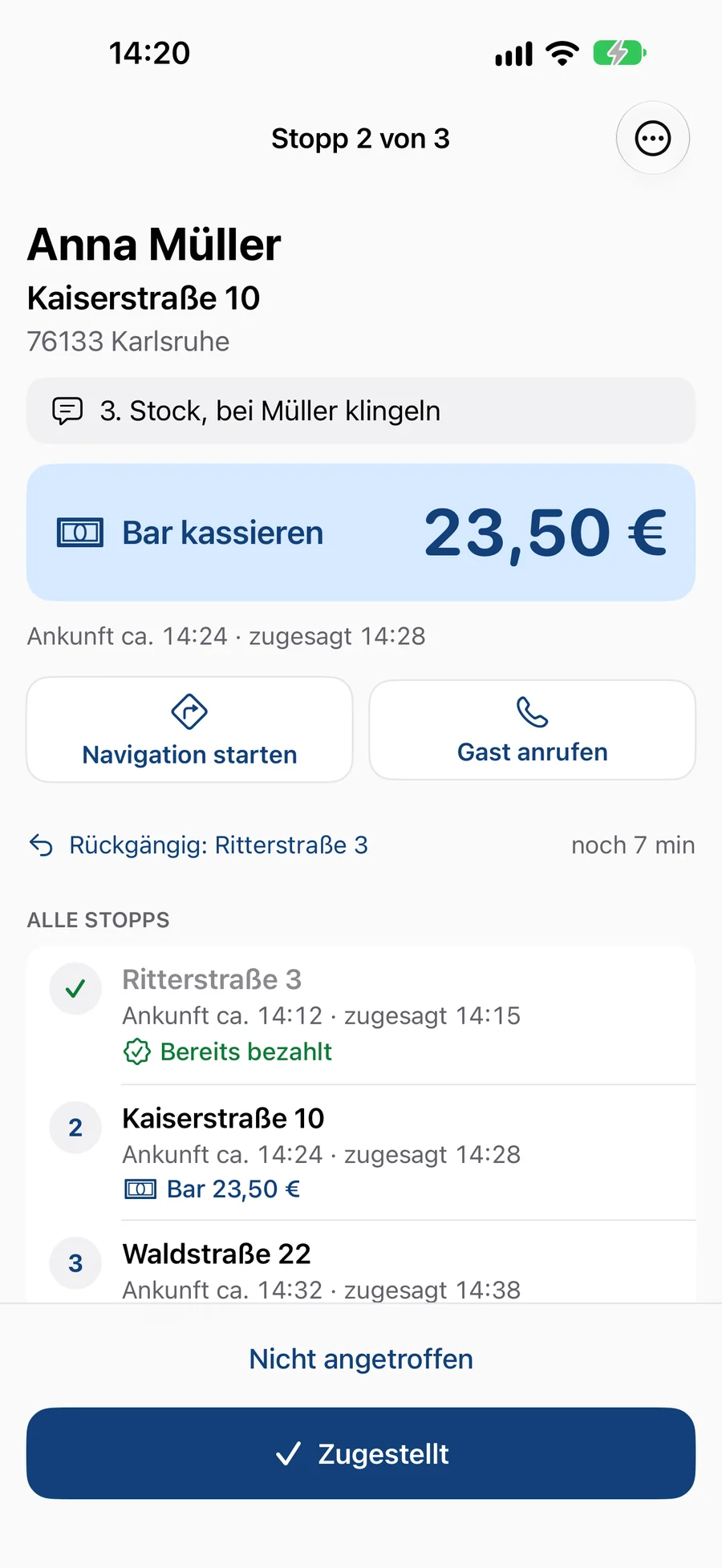
From your guest’s first tap to the handover. Click through the five steps.
Your guests order directly from you: no download, no middleman.
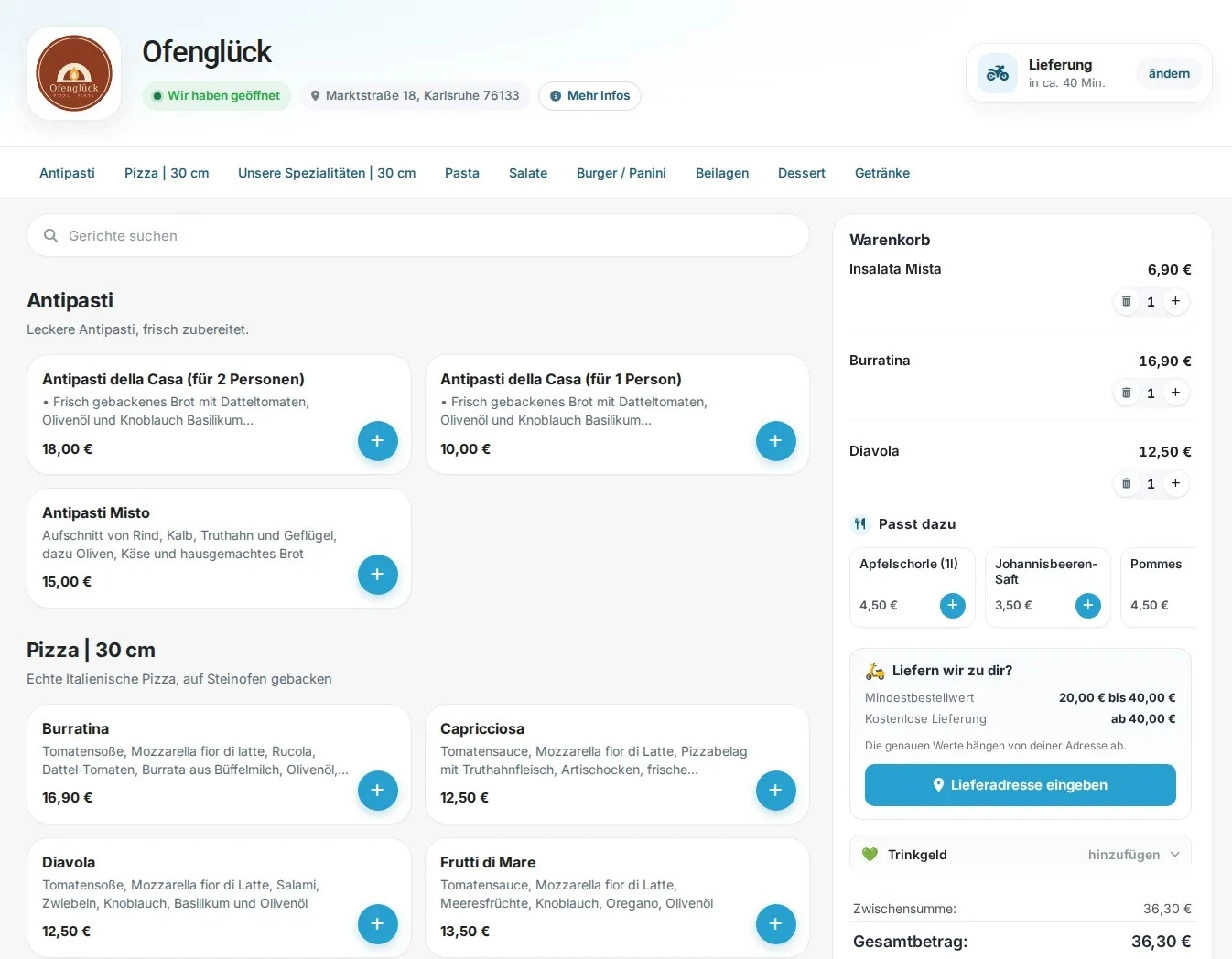
A fast ordering page with your logo and your menu. It runs in the browser on any phone, for delivery and pickup. On the Pro plan, regulars save it as an app on their home screen.
Order as a guest, no account and no registration
Sizes, extras and sides can be chosen right at the dish
The delivery address is checked against your delivery areas already in the basket
It’s paid before you fire up the oven.
Online payment runs through your own Mollie account. The money goes straight to you. eatbase is not the payee and charges no extra fees. The fees of your Mollie account apply.
Card, Apple Pay, Google Pay and PayPal, plus cash on handover
Tips at checkout, you set the suggested amounts
Vouchers and discount codes right in the basket, discount promotions like “10 % off pickup” are deducted automatically (from Start)
How would you like to pay?
Apple Pay
Google Pay
CardVISA · Mastercard
PayPal
Cash on handover
💚 Tip0 %5 %10 %15 %
Total38,30 €
Place order and pay
One tap on the tablet, and the order is under way.
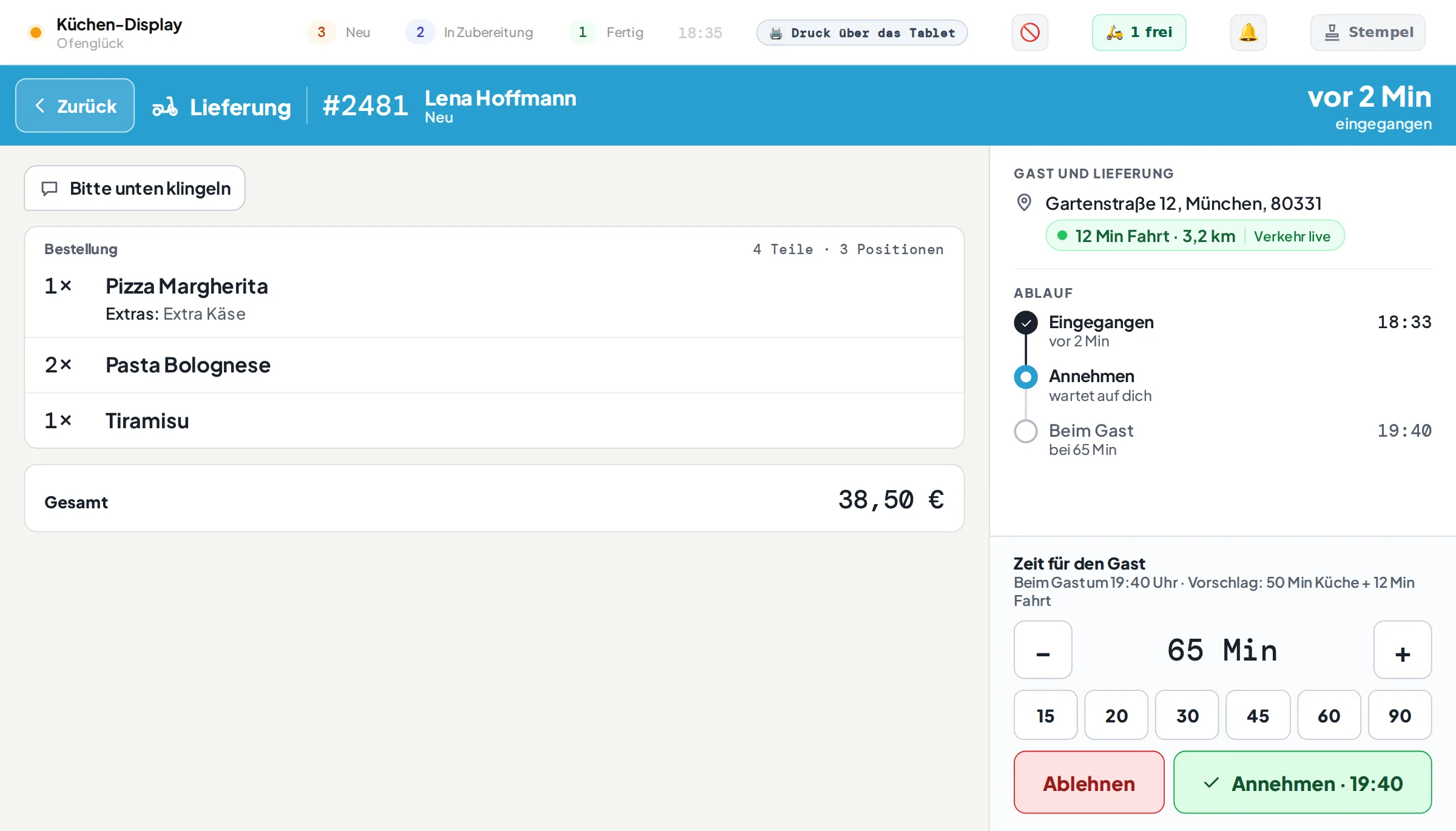
New orders announce themselves with a sound on the kitchen display. You see the items, special requests and, for deliveries, the travel time based on current traffic.
Adjust the time for the guest with plus and minus, then confirm
If you like, eatbase accepts orders automatically
Decline in exceptional cases, the guest is informed immediately
The receipt prints the moment you accept.
The kitchen receipt and customer receipt come out of the thermal printer automatically. On the display, the order moves from New to Preparing to Ready.
Kitchen display as an app on the tablet, three columns, big buttons
Short order code for the kitchen instead of long numbers
Sold out? Block the dish right on the display, visible in the shop immediately
KITCHEN#PM4DELIVERY · 19:251× Pizza Margherita + Extra cheese 2× Pasta Bolognese1× Tiramisu Please ring the bottom bell
Your guest sees live where their order is.
After ordering, the guest lands on a status page that updates by itself. On top of that comes the confirmation by email. The phone in the kitchen stays quiet.
Received, preparing, on the way or ready for pickup
The promised time is the same everywhere: status page, email and receipt
Notification on the phone as soon as the order is ready or on the way, via your own app (Pro)
Status SMS to the guest on the Pro plan
On the Pro plan with a button for a Google review as soon as the order is on the way, ready for pickup or completed
Order #PM4● Live
ReceivedBeing preparedOn the way
🕑 Expected today at 19:25
ReceivedBeing preparedOn the way
Ordering at the table
Scan the QR code, order, done.
Every table gets its own QR code. Your guests scan it, order from the menu, and the order arrives on your tablet with the table number. You accept it as usual, and only then is it printed.
QR codes per table, a ready-made sheet to print out
Payment the way you want: with the staff or directly online
Every order goes through your acceptance, no nonsense without control
Your control centre
One look, and you know how the day is going.
Orders, menu, sales and delivery areas are all in one admin area. Clear, fast and usable without training, on the computer just as on the phone.
Today’s sales and orders on the start page
Manage dishes, prices and photos yourself, no prior knowledge needed
Several users with their own roles and permissions
And everything around it
Everything that’s included
The details that make the difference day to day. Choose an area and tap a card to read more.
The pizza in three sizes, the burger with extra cheese, the bowl with a choice of side. You create an option once and attach it to as many dishes as you like, with or without a surcharge. For a single dish you can change the price, for example two toppings included on the lunch menu.
You assign its allergens to every dish, and your guests see the information right next to the dish on the ordering page.
Guests read your menu in English, French, Spanish, Italian, Dutch, Polish, Turkish or Ukrainian. The translation is created automatically, and you can adjust every text yourself. Allergens have fixed translations. Receipts and the kitchen stay in German. Included in every plan.
Breakfast only in the morning, lunch menu only at midday: for each dish you set on which weekdays and at what times it is visible.
Offer a dish at a lower price for a while, for a fixed period or recurring on certain weekdays. Guests see the offer price next to the crossed-out normal price.
You switch off sold-out dishes or extras right on the kitchen tablet. This is visible in the shop immediately, and nobody orders something that’s no longer available.
eatbase charges food and drinks at the correct rate and shows the VAT separately on the receipt.
You draw your delivery areas on the map or set a radius. Each area gets its own delivery fee and its own minimum order value, for example the town centre cheaper than the surrounding area.
The guest enters their address right in the basket. eatbase checks which area it is in and applies the fee and minimum order value automatically.
Guests pre-order for later in the day or for the coming days. How far in advance, you set separately for delivery and pickup.
When you accept, the kitchen display shows the travel time to the address based on current traffic. So you promise the guest a time you can actually keep.
You set how many orders may come in per time slot, by weekday, time and order type. When a slot is full, your page offers the guest the next free one.
You enter your holiday closure in advance: during that time orders are paused and your guests see a notice. For a short break in between, there is a switch on the tablet.
The eatbase app shows your orders in three columns: New, Preparing, Ready. An order moves from left to right through your kitchen.
If you like, eatbase accepts orders automatically, and the receipt then prints right away. The preparation timer keeps an eye on the promised time.
As soon as an order is accepted, the kitchen receipt and customer receipt print automatically on your thermal printer. If a receipt doesn’t come out, you’ll know.
In the admin app menu you see sales, cash for the till count, card payments to match against the card terminal and the taxes for the current day. With one tap you print it all as a receipt.
You design the header and footer text of your receipts yourself. eatbase adds the required details such as items, totals and VAT automatically.
Every order gets a short code that the kitchen, the counter and the guest all read the same way. That saves questions at handover.
Accepted orders are booked automatically as receipts in your POS, with separate payment methods and VAT split correctly.
The ordering page carries your logo and your menu. On the Pro plan you also get your brand colour and your own domain.
Guests save your restaurant as an app with one tap, without an app store. If they like, they get a notification when the food is ready, and you can tell them about promotions. QR code poster included. Included on the Pro plan, otherwise as an add-on for 14 € a month.
If you want to be found in the App Store and on Google Play, we build you a real app for iPhone and Android. It costs from 399 € one-off and 69 € a month (net) and can be cancelled monthly. For more features or a custom design, we give you a quote based on scope.
You add the link to your ordering page in your Google Business Profile. Guests go from the search straight to you instead of to a platform.
Order confirmations to your guests show your restaurant name as the sender.
All order data belongs to you. You can export it at any time and use it yourself. Our servers are in Germany, processing complies with data protection law, and data can be deleted at any time.
Several users with their own roles. The tablet in the kitchen gets its own device account.
Pro plan
Premium features for more sales
On the Pro plan you unlock tools that build guest loyalty and increase the order value. Click through: each animation shows what your guest sees and what arrives on your side.
OfenglückDelivery · 45–55 min
Your basket
1× Cheeseburger9,90 €
1× Fries3,50 €
Total9,90 €13,40 €
✨ Goes well with it
🍟
Fries3,50 €
+✓
🥤
Cola 0.5 l2,90 €
+
🍔Burger in the basket
💡Suggestion: fries with that?
📈+3,50 € order value
OfenglückDelivery · 45–55 min
🚚 Only 8,10 € to free delivery🚚 Only 3,60 € to free delivery🎉 Delivery is free!
Anything else?
🍮
Tiramisu4,50 €
+✓
💧
San Pellegrino 0.5 l3,90 €
+✓
1 item2 items3 items9,90 €14,40 €18,30 €
Delivery2,90 €2,90 € 0,00 €
Total12,80 €17,30 €18,30 €
🚚Only 8,10 € to free delivery
🛒Guest adds something
🎉Free delivery: +8,40 € order value
OfenglückDelivery · 45–55 min
🎁 Orders from 25 €: free tiramisu✓ Done: your tiramisu is free
Only 3,30 € to your free dessertCondition met, dessert is in the basket
1× Pizza Diavola11,90 €
1× Pasta al Forno9,80 €
1× Cola 0.5 l3,40 €
1× Tiramisu FREE4,50 € 0,00 €
Total21,70 €25,10 €
🥤
Cola 0.5 l3,40 €
+✓
🎯Promotion: free dessert from 25 €
🧾25,10 €: threshold reached
🎁Tiramisu free automatically
OfenglückCreate account
🎁 5 € welcome credit for new customers
Create account
Welcome, Lisa! 👋
5 €
Your welcome credit is in your account
Order now
OfenglückTo checkout
1× Pizza Funghi10,90 €
1× Cola 0.5 l2,90 €
Subtotal13,80 €
🎁 Welcome credit−5,00 €
To pay13,80 €8,80 €
Order now
🆕New guest creates an account
🎁5 € credit, available instantly
🛒First order placed
OfenglückMy account
✓ Order #2483 completed
Your stamp card7 / 88 / 8
🍕🍕🍕🍕🍕🍕🍕8🍕
Only 1 stamp to your free pizza🎉 Your next pizza is free!
🍕
🎟️
1× Free pizzaon your next visit, automatically
18:47
Friday, 4 September
Ofenglücknow
Card full!
Your next pizza is free.
OfenglückStamps8 / 8
🍕🍕🍕🍕🍕🍕🍕🍕
Reward1× Free pizza
🧾Guest has ordered
✅Stamp 8 of 8, automatically
🍕Free pizza: guest comes back
📲In the wallet too, no app
🔔Notification with every stamp
OfenglückOrder #2483
✓ Order confirmedTotal26,20 €
+1,31 €
💶 Your credit3,20 €4,51 €5 % cashback on every order
OfenglückNext order · To checkout
1× Pizza Funghi10,90 €
1× Insalata Mista6,50 €
1× Cola 0.5 l2,50 €
Use credit4,51 € available
💶 Credit−4,51 €
To pay19,90 €15,39 €
💸5 % cashback on 26,20 €
💶Credit grows: 4,51 €
🔁Guest orders from you again
Inbox11:02
Ofenglück11:02
Long time no see, AnnaYour Pizza Diavola is waiting for you.
P
Parcel service09:40
Your parcel arrives todayDelivery between 1 and 4 pm.
S
Energy supplierYesterday
Your annual statementPlease find your statement attached.
L
LisaMon
Cinema on Saturday?Do you fancy the late showing?
T
Sports clubSun
Training on ThursdayThis time we meet at 7 pm.
Ofenglück
Long time no see, AnnaYour favourite dishes are still on the menu:
🍕
Your favouritePizza Diavola
11,90 €
🍝
Often orderedPasta al Forno
9,80 €
Your personal codeWIEDER-7KQ2MX10 % off · valid for 14 days
Order now
Unsubscribe from these emails
OfenglückYour basket
1× Pizza Diavola11,90 €
1× Pasta al Forno9,80 €
1× Water 0.5 l2,30 €
🎟️ Code applied−2,40 €
✓ WIEDER-7KQ2MX · 10 %
Total24,00 €21,60 €
Order · 21,60 €✓ Ordered
📅30 days without an order
🎟️Personal code, valid once only
🔁Anna orders again
Inbox19:48
Ofenglück19:48
Your order is still open2× Pizza Margherita, 1× Tiramisu
B
Bank17:12
Your bank statement is readyLog in to view it.
M
Mum15:30
Coffee on Sunday?Feel free to bring cake.
F
GymYesterday
New classes in NovemberBook your place now.
V
LandlordMon
Stairwell is being paintedOn Wednesday from 8 am.
Ofenglück
Your order is still openHi Anna, you started an order earlier but didn’t send it. Your basket is still there:
🍕
2×Pizza Margherita
17,80 €
🍰
1×Tiramisu
5,90 €
Complete order
Unsubscribe from these emails
OfenglückYour basket
2× Pizza Margherita17,80 €
1× Tiramisu5,90 €
✓ Basket restored
Total0,00 €23,70 €
Order · 23,70 €✓ Ordered
🛒Left checkout 2 hours ago
👤Only to guests who have ordered from you before
✅Order saved
RegularsNew newsletter
Occasion
🍂 Seasonal menu
Subject
Now available: our seasonal menu
Show dishes
🎃Pumpkin pizza12,90 €
🍄Chanterelle pasta13,50 €
To whom?
214 regulars
Send newsletter
RegularsNewsletter results
214sent
041ordered afterwards
With email19 %
Without email8 %
Extra revenue from the email0 €+ 602 €
✍️Choose a template, adjust, send
🛡️At most 2 emails per guest per month
📈Measured against guests without an email
OfenglückOrder #2511
✓ CompletedEnjoy your meal, Anna!
1× Pizza Diavola11,90 €
1× Pasta al Forno9,80 €
Did you enjoy it?We’d love to hear your review.
Review on Google
Review Ofenglück Public as Anna B.
★★★★★
Diavola as great as always, will order again!
Post✓ Thanks for your review
📍Right on the order status page
⚖️All guests are asked the same way
📈4,6 ★ (128)4,7 ★ (129)Reviews on Google
Kitchen display
#2483 · Lisa B.3 items · 26,20 € · paid online
NewAcceptedOn the way
18:47
Friday, 4 September
💬 Messages19:05
Ofenglück
Your order #2483 is on its way 🛵 Enjoy your meal!
💬 Messages18:47
Ofenglück
Your order #2483 has been accepted. It will be with you in about 35 min.
📲SMS on acceptance, automatically
🛵SMS when “On the way”
☎️No more “Where’s my food?” calls
OfenglückDelivery · 45–55 min
PizzaPastaSalads
🍕
Pizza Margherita9,90 €
+
🍝
Pasta al Forno11,50 €
+
🥗
Insalata Mista7,40 €
+
To basket · 21,40 €
Brand colour
Applies instantly to your site and emails
Ofenglück
Your order has been acceptedHi Lisa, we are preparing your order #2483. Delivery at around 19:20.
1× Pizza Margherita9,90 €
1× Pasta al Forno11,50 €
Total21,40 €
View order
Ofenglück · Marktstraße 18 · Karlsruhe
🎨Choose your colour
⚡Your site uses it instantly
✉️In guest emails too
🔒eatbase.de/ofenglueckshop.your-restaurant.com
OfenglückOrder · Book a table
Popular
🍕
Pizza Margherita9,90 €
+
🍝
Pasta al Forno11,50 €
+
🥗
Insalata Mista7,40 €
+
To basket · 21,40 €
🔒 Secure connection · SSL active
Own domain
shop.your-restaurant.com
Connect✓ Connected
DNS record found✓
SSL certificate issued✓
Address switched✓
🔗Before: address at eatbase
⚡One DNS record, eatbase does the rest
🌐Your site under your own name
OfenglückMenu · Pickup
Pizza
🍕 Pizza Margherita9,50 €
🍕 Pizza Diavola11,90 €
🍕 Pizza Funghi10,50 €
🍝 Pasta al Forno9,80 €
🥗 Insalata Mista7,20 €
Ofenglück as an appOrder straight from the home screen
“Goes well with it”: the guest is offered fries with their burger.
Our AI reads your menu and creates suitable recommendations, from tzatziki with gyros to a drink with pizza. The system learns with every order.
AI by Mistral AI with servers in the EU; only menu data is sent, never guest data
Suggestions in the basket, right after adding an item, and as small extras at checkout
Larger size, “Popular” badges, meal suggestions and “Order again” included, each one can be switched off
1 / 14
Pro plan
“Only 8,10 € to free delivery”: the bar fills up and the guest adds more.
You set a threshold. The basket shows how much is still missing, and the guest would rather take the dessert than pay the delivery fee.
Threshold freely selectable per location
Bar and remaining amount update with every click
Small orders become medium ones
2 / 14
Pro plan
Threshold reached, free dessert: promotions the basket triggers on its own.
A free tiramisu from 25 €, a drink from 40 €, a free item with every pizza: you set the rule, and the basket adds the item automatically as soon as the condition is met.
Threshold offers and free items, also for a limited time
Promotion notice at the top of the menu
No code, no questions, no corrections at checkout
3 / 14
Pro plan
5 € welcome credit: this is how an anonymous guest becomes an account with a name.
New customers get credit when they sign up that is only valid with you. The first order comes straight away, and the second is just one click away.
You decide the bonus amount
Deducted automatically at checkout
Once per guest
4 / 14
Pro plan
A stamp card without paper: one stamp for every order, the eighth pizza is free.
The card lives in Apple Wallet or Google Wallet, without an app, and works online just like in your restaurant. No stamp gets lost, no card stays in a jacket pocket. You decide the reward and the number of stamps.
Stamps are added automatically for every completed online order, and the reward is redeemed with the next order
At your restaurant, your team scans the card on the kitchen display. Guests without a card get one at the counter via QR code or a table stand, without a customer account
In the wallet the card counts along by itself, and the guest gets a notification like “New stamp: 7 of 10”
The card carries your colour and your logo, with six designs to choose from
Nearby notice: when the guest is close to your restaurant, the card can appear on the lock screen with your text, for example “Hungry? We’re just around the corner.” Apple and Google decide exactly when
You send offers as a notification to the card, only to guests who have agreed, and at most every 48 hours
You see how many guests take part, how many have the card in their wallet, how many come back and how often they order
5 / 14
Pro plan
Euro credit and cashback: every order pays into the next one.
A percentage of every order goes into the guest account as credit. It is redeemed with a switch at checkout. The credit is only valid with you, so the guest only comes back to you.
Cashback rate freely adjustable
Credit can also be given manually, for example as an apology
Guests see their credit in their account and when ordering
6 / 14
Pro plan
“Long time no see, Anna”: anyone who hasn’t ordered for a while gets mail from you.
If a guest hasn’t ordered from you for a while, eatbase automatically sends them an email in your name. It shows their favourite dishes and a button that leads straight to your menu. If you include a discount code, it is already applied in the basket.
After 21, 30, 45, 60 or 90 days without an order, each guest at most once per break
Optionally with a personal discount code in percent or euros, redeemable only once and only with you
Plus a thank-you a few days after the first order, and a reminder about credit and stamps while a loyalty programme is running
You see how many guests ordered again and how much extra revenue the emails brought in
At checkout there is a short notice with “No thanks”, and every email has an unsubscribe link
7 / 14
Pro plan
Almost ordered, then something came up: the reminder brings the order back.
A regular was already at checkout and didn’t send the order. One, two or three hours later they get a short email in your name with what was in the basket. One tap on the button and the basket is full again, even on another device.
Only to guests who have ordered from you before; anyone who has ordered in the meantime gets nothing
Deliberately without a discount, so nobody learns that abandoning pays off
At most one reminder per guest in 14 days, sent until 10 pm
You see how many orders the reminder saved
8 / 14
Pro plan
New seasonal menu? Tell your regulars, and see what it brought in.
You choose an occasion, adjust the suggestion, show up to three dishes with pictures and send the newsletter to your regulars, right away or scheduled. Afterwards you see how many ordered and how much extra revenue the email brought in.
Templates for new dishes, seasonal menu, lunch specials, weekends and holidays
Optionally with a personal discount code for every guest
You decide how often a guest receives mail at most, across all emails together
Extra revenue measured: a small share of guests gets no email, for comparison
9 / 14
Pro plan
“Did you enjoy it?”: a button on the order status page takes your guests straight to your Google review.
As soon as an order is on its way, ready for pickup or completed, the order status page shows a card with the button “Review on Google”. It opens your restaurant’s review window directly. Guests who agreed at checkout also get an email with the same request shortly after their order.
All guests are asked the same way, with no pre-selection and no discount for a review, in line with Google’s guidelines
The email only with the guest’s consent at checkout, between 30 minutes and 3 hours after the order depending on your settings
eatbase finds the link to your Google listing itself at the push of a button
You see how many guests went on to Google via the status page and how many via the email
10 / 14
Pro plan
“Your order is on its way”: the guest knows without having to call.
When the order is accepted and with every status change, an SMS goes to the guest automatically. The phone in the kitchen stays quiet.
Triggered by the kitchen display, no extra step
200 SMS per month included, then 0,15 € per SMS
Texts with your restaurant name
11 / 14
Pro plan
Your colour: ordering page, reservations and every guest email in the look of your restaurant.
You choose your brand colour in the admin area, everything else happens by itself. Buttons, banners and badges use it instantly, on the site and in every email to your guests.
Choose a colour and see it in the preview instantly, without reloading
Applies to the menu, reservations, the embedded widget and all guest emails
We check the contrast so text on your colour stays readable
12 / 14
Pro plan
Your address instead of ours: ordering page and reservations run under your own domain.
You enter your domain in the admin area and set a single DNS record. eatbase handles the check, SSL certificate and switchover on its own, and until then your site keeps running under a temporary address.
An address like shop.your-restaurant.com, with the padlock in the browser
One DNS record is enough; we issue and renew the certificate
No domain yet? Buy one right in the portal from 15 € net per year, and you remain the owner
13 / 14
Pro plan · otherwise add-on 14 € / month
“Ofenglück as an app”: your restaurant on your guests’ home screen.
Your menu invites your guests to save you as an app. One tap, and your logo sits next to their other apps. If they like, they get a notification on their phone as soon as the order is ready or on its way.
With your logo and name, no app store and no download hurdle for your guests
Notifications for acceptance, “ready” or “on the way”, and cancellation, with no SMS costs
Promotions by notification to guests who have agreed, with delivery and click figures
QR code poster to print out, updates arrive automatically
Web app: runs in the phone’s browser, with notifications on iPhone from iOS 16.4
14 / 14
Also on the Pro plan:🧾 Customer receipt without the eatbase notice
The POS integration is not tied to the Pro plan. You can add it to any plan, including Free. Currently ready2order is connected, other POS systems on request.
Kitchen display
#2483 · Lisa B.
1× Pizza Diavola11,90
1× Pasta al Forno9,80
1× San Pellegrino4,50
Paid online · 26,20 €
Accept✓ Accepted
ready2order · POS
Receipt #4711eatbase order #2483
Pizza Diavola11,90
Pasta al Forno9,80
San Pellegrino 0.5 l4,50
Food · 7 % VAT21,70
Drinks · 19 % VAT4,50
Payment methodOnline (eatbase)
Total26,20 €
BOOKED ✓
End-of-day reportbalances ✓
👆One tap: accept the order
🧾Receipt booked in the POS automatically
✅7 % and 19 % cleanly separated
Add-on · 29,90 € / month
Accepted in the kitchen, booked in the POS: the receipt lands in ready2order by itself.
Every accepted order is booked as a receipt in your POS, with separate payment methods for online and cash, correctly split VAT and cancellations. Your end-of-day report still balances.
Your branded ordering page is always included in your plan, with your logo and your menu. Your own brand colour, your own domain and your own app are unlocked on the Pro plan. A general restaurant homepage (about us, gallery, opening hours) is not part of the plan but an optional add-on: as a template from 299 € or custom designed from 499 €.